Annoying search engine abroad question

Google Chrome asks you if you would like to use another omnibox search engine when you move from one country to another. When you move across the border a lot, then this becomes quite an annoying message:

"Would you like to search with google.country1 instead of google.country2?"

If you always want to use e.g. google.nl, then make the following change:
  • Wrench -> Options -> Basics -> Manage search engines
  • Scroll to the bottom and fill in the columns:
  • In the first column: GoogleNEW
  • In the second: Google
  • In the third: http://google.nl/search?{google:RLZ}{google:acceptedSuggestion}{google:originalQueryForSuggestion}{google:searchFieldtrialParameter}{google:instantFieldTrialGroupParameter}sourceid=chrome&ie={inputEncoding}&q=%s
  • Hit Enter/Return, else the results will no be saved
  • Hover over the third column and click "make default"
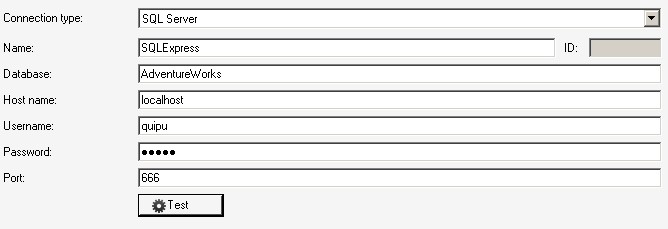
Quipu connections

Several ways to create a database connection in the open source data warehouse generator Quipu.

SQL Express
  • SQL Server configuration manager -> 
    • Protocols for SQLExpress -> TCP/IP: enabled
    • TCP/IP -> IP Adresses -> IP All -> TCP Dynamic Ports: empty
    • TCP/IP -> IP Adresses -> IP All -> TCP Port: 666
  • SQL Server management studio -> SQL Express server properties -> Security -> Server Authentication: SQL Server and Windows Authentication mode
  • Create a SQL Server authentication login on the database server and assign it to the database that will be used by the connection, e.g. login: quipu, password: quipu
  • If the database runs on the same machine as Quipu, use "localhost" as the host name. Otherwise use the remote host name
Note:
  • Do not use the instance name, e.g. using "AdventureWorks;instance=sqlexpress" as database works, but will, depending on the SQL Server version, result in an "unable to get information" error.